Homeport: a place for Codex to keep working
How Codex App Server runs the agent, Pydantic checks the data, and Homeport keeps tasks on a Mac mini—with the access limits you need to understand.
Updated
On this page 8 sections
I wanted to start a coding task from my laptop, leave it running on my Mac mini, and return to it from another device. The files, processes, and conversation should stay on the Mini. Closing my laptop should not stop the work.
That became Homeport: a private browser workspace built around Codex App Server. Codex runs the coding agent. Python handles the task queue and recovery. SQLite saves the records. Pydantic checks that those records contain the fields and values the program expects.
I use Pydantic at work. Here, its value is concrete: a browser request, a saved task, and a Codex response all cross different parts of the system. I want errors at those boundaries to be caught before they become a wrong session, a lost result, or an unexplained status.
What happens when I press Send?
Suppose I type “Run the tests and explain any failures.” Homeport saves that instruction as a task. Codex keeps the conversation in a thread. A turn is one round of work in that thread, including any tool calls and the reply.
- Homeport web appChecks access. Accepts the request.Pydantic validates
Submission → Task - SQLiteSaves the task before work starts.Stores the prompt,
IDs, state, and results - Python workerTakes the next task. Starts or resumes its conversation.Saves intent, then sends
turn/start - Codex App ServerRuns the agent. Uses tools. Maintains the conversation.JSON-RPC over
a private Unix socket
Here is the request path in the current worker:
- Check and save the request. FastAPI uses Pydantic’s
Submissionmodel to check the browser’s JSON. Homeport creates aTaskand saves it in SQLite with statequeued. - Choose work to run. The Python worker takes a queued task when it has no running task to observe. It checks the ChatGPT login, then creates a thread with
thread/startor opens the saved thread withthread/resume. - Send the instruction to Codex. The worker saves its intent to submit, then calls
turn/startwith the thread ID and prompt. This is what “dispatch” means here: send a saved task’s instruction to App Server so Codex can begin work. - Observe and save the result. The worker records events and reads the turn state. It uses Pydantic to validate the returned turn and final result. The browser reads conversation history through Homeport to show messages and command output.
There are three useful IDs. The task ID identifies the Homeport request. The thread ID identifies the Codex conversation. The turn ID identifies the round of work that Codex accepted. Saving all three lets Homeport distinguish “continue this conversation” from “check the work that already started.”
Codex App Server is the agent interface
Codex App Server exposes Codex through a structured protocol. A client can create and resume conversations, start turns, receive events, and handle approval requests. It provides the integration point for an application such as Homeport.
Our tested setup uses Codex CLI 0.160.0. Homeport runs one persistent App Server and connects through WebSockets over a private Unix socket on the Mini. The Python RPC client sends JSON-RPC messages. It does not read text from a terminal screen or type prompts with tmux send-keys.
That gives me defined operations to use. turn/start begins work. turn/interrupt requests a stop. In this version, thread/read with includeTurns retrieves history for inspection. A completion status comes from Codex’s turn record, not from a guess about the wording of its reply. Current protocol documentation includes newer history APIs, so an upgrade needs compatibility tests.
The optional terminal can connect to the same live server and thread:
codex resume --remote unix:///path/to/codex.sock THREAD_IDWe tested a browser-submitted task appearing in the attached terminal. Starting a second server does not attach it to that conversation. The remote terminal also inherits the server’s permissions; this tested release rejects permission override flags on remote resume.
My installation uses normal Codex authentication with my ChatGPT account. The setup check reported my Pro plan. I did not add a separate API key. Plan limits still apply. Files and agent processes stay on the Mini, while model inference runs through OpenAI. Relevant prompts, code, and tool output can leave the Mini as part of those model requests.
Why use Pydantic instead of plain dictionaries?
Python type hints describe the values a function expects. They help an editor or static checker find mistakes, but they do not check JSON received while the program runs. Pydantic adds runtime validation, conversion to Python types, and serialization back to JSON. A Pydantic “model” defines data; it is not a language model.
For Homeport, the benefit is a shared definition of a valid record. I could write these checks by hand. Pydantic keeps them next to the fields and gives callers consistent errors.
For example, this uses the actual browser request model from Homeport:
from uuid import UUID, uuid4
from pydantic import ValidationError
from magerbot.web import Submission

request = Submission.model_validate({
    "id": str(uuid4()),
    "prompt": "Run the tests and explain any failures",
    "timeout_seconds": 120,
})

# The JSON string has become a Python UUID.
assert isinstance(request.id, UUID)

try:
    Submission.model_validate({
        "id": str(uuid4()),
        "prompt": "Run the tests",
        "timeout_seconds": -10,
    })
except ValidationError as error:
    print(error.errors()[0]["loc"])  # ('timeout_seconds',)
This example validates data only. It does not run Codex. In the web app, the invalid request receives a validation error before Homeport adds a task to the queue. The same model rejects a blank prompt, a malformed request ID, and an unknown field such as timeout_second.
Here is where the checks apply in Homeport’s models and web interface:
| Record | What Homeport checks | Why it matters |
|---|---|---|
Submission |
Request ID, nonblank prompt, timeout greater than zero and no more than one day | Reject a bad browser request before queueing it |
Task |
IDs, allowed state names, existing project directory, positive timeout | Use one task format across the worker, web app, and storage |
Config / WebSettings |
Paths, positive timing values, expected settings, valid web origin | Catch invalid setup data when it loads |
Event |
Method name, timestamp, request ID, dictionary of parameters | Store a consistent event envelope |
Turn / Result |
Expected status values and result fields | Reject an unexpected status instead of displaying false success |
Some event parameters and tool items remain dictionaries. We do not claim to validate every nested Codex payload. Homeport’s own models reject extra fields; the Turn model allows extra protocol fields so an additive change need not break it.
Pydantic also handles the storage boundary. The store calls task.model_dump_json() to write a task and Task.model_validate_json() to load it. UUIDs, paths, and timestamps return as typed Python values. SQLite provides the durable storage; Pydantic checks the record being stored or restored.
Validation has limits. A valid completed value does not prove that the tests passed. A valid prompt does not make its requested command safe. Pydantic also does not enforce the legal order of task states. The worker must make those decisions; Pydantic checks the data it uses.
What about Pydantic AI?
Pydantic AI is a separate agent framework. You can select a model, expose Python functions as tools, pass application dependencies, and define a validated output type. It manages the exchanges between the model and tools until the run produces an answer.
For example, I could build a support agent that calls an order lookup function and returns a record with reply, order_id, and needs_human_review. Pydantic AI would help connect the model, tool, and expected output. Validation would check the record’s structure, not establish that the answer is correct.
Homeport uses Pydantic v2, not Pydantic AI. Codex already runs the model-and-tool loop. I need a reliable way to submit work, keep records, and return to a conversation. I do not currently need another agent to decide what Codex should do. Pydantic is useful here without adding a second model loop.
What happens if the connection fails?
Suppose Codex starts editing a file, but Homeport loses the reply that confirms the turn started. Sending the prompt again could repeat the edit. Homeport saves intent before turn/start. If it has the turn ID, it reconnects to observe that work. If acceptance is unclear, it marks the task uncertain and waits for inspection instead of sending it again. Browser retries reuse the request ID so they do not create a second task.
That is the recovery code’s job, not a Pydantic feature. A timeout requests an interruption; it cannot undo a command that already ran. Our worker-restart test used a delayed file append and confirmed one appended line. That is evidence for one recovery path, not a guarantee for every failure.
What protects access—and what does not?
I would not describe Homeport as secure simply because it uses Tailscale or Pydantic. There are separate questions: who can send a task, what the agent can do, and where the data goes. This is an early personal tool, not an independently audited service.
Who can reach it. The web process listens on 127.0.0.1:8787. Tailscale Serve supplies private HTTPS and identity headers. Homeport checks that identity against the configured owner for requests through the private hostname. It also checks the request host and requires a matching origin plus a custom header for writes. The setup script does not enable public Tailscale Funnel.
What is trusted locally. The loopback interface accepts local requests without the Tailscale owner check. A process running on the Mini can make those requests and can supply the required headers. Serve identity headers are trustworthy only when traffic reaches the app through the expected proxy. Keep the service bound to loopback and treat the Mini as a trusted host. This is not isolation from hostile software already running there.
What Codex can do. My installation deliberately uses danger-full-access and approval policy never. Codex can use the files and network resources available to that macOS account without command approval. It does not automatically get root or bypass macOS privacy controls. A private connection does not stop a bad instruction, malicious repository content, or a mistaken command from causing damage.
This policy is fixed in the current configuration model, supervisor, and worker. The browser does not implement command approval. Changing one configuration value is not a supported way to make this release sandboxed. A restricted mode would need code changes and tests across those components. For a first trial that requires permission prompts, use Codex directly with restricted permissions and approvals.
What stays private. Codex manages its login on the Mini; Homeport does not send the login token to the browser. Task and event records are stored locally with restricted file permissions. They are not encrypted by SQLite itself and may contain sensitive prompts or tool output. The browser also saves drafts on that device. Model requests still go to OpenAI.
What the file viewer protects. It limits previews to the selected project, rejects hidden paths and paths that escape through symlinks, and caps file size. These rules do not restrict the full-access agent. Likewise, an instruction in AGENTS.md to avoid a repository is not an operating-system security boundary.
How I would test a new installation
Start with a separate standard macOS account or a dedicated test machine. Give it only a disposable repository and the credentials needed for that test. Do not begin with production cloud credentials, private document folders, or automatic mounts of sensitive files. Keep backups outside the agent’s write access.
Then follow this sequence:
- Read the permission model before installing. The repository setup guide installs a user LaunchAgent and starts the full-access server. It is not a sandbox setup guide. The recorded compatibility tests used Codex CLI 0.160.0; check the installed version and test changes before relying on an upgrade.
- Check local access first. Open
http://127.0.0.1:8787on the host. Confirm the listener is loopback-only. Keep the App Server socket private. Do not expose either service through a router port forward or a public proxy. - Add private device access. Sign in to Tailscale on the host and client. Run the repository’s
scripts/share-tailnet.pywith its virtual-environment Python, then run the web restart command it prints. Use Serve, not Funnel. Restrict tailnet access to the intended devices and protect the sign-in account with MFA. - Test rejection as well as access. Confirm the owner’s device can open Homeport. A different Tailscale user must receive a denial. Check that the URL cannot be reached after Tailscale is disconnected on a remote client with no other route to the tailnet. A failed remote connection does not prove the local host is isolated.
- Start with a small task. In the disposable repository, ask Codex to explain one file. Close and reopen the browser. Confirm that the same conversation and result remain. Then try a small edit, inspect the diff, and run the tests before granting access to more projects.
On the host, these read-only checks help inspect the network setup:
lsof -nP -iTCP:8787 -sTCP:LISTEN
tailscale serve status
tailscale funnel status
The first command should show 127.0.0.1:8787, not a listener on every interface. The Serve configuration should proxy private HTTPS to that loopback address. Funnel must not publish Homeport. These checks cover network exposure; they do not prove that every command the agent runs is safe.
The repository includes tests for rejected web requests, file-viewer boundaries, validation, and recovery. Run uv run pytest -q and npm ci && npm test in the checkout. Passing tests are useful evidence about those paths, not a security audit of your machine, credentials, or network policy.
What stays running when I leave?
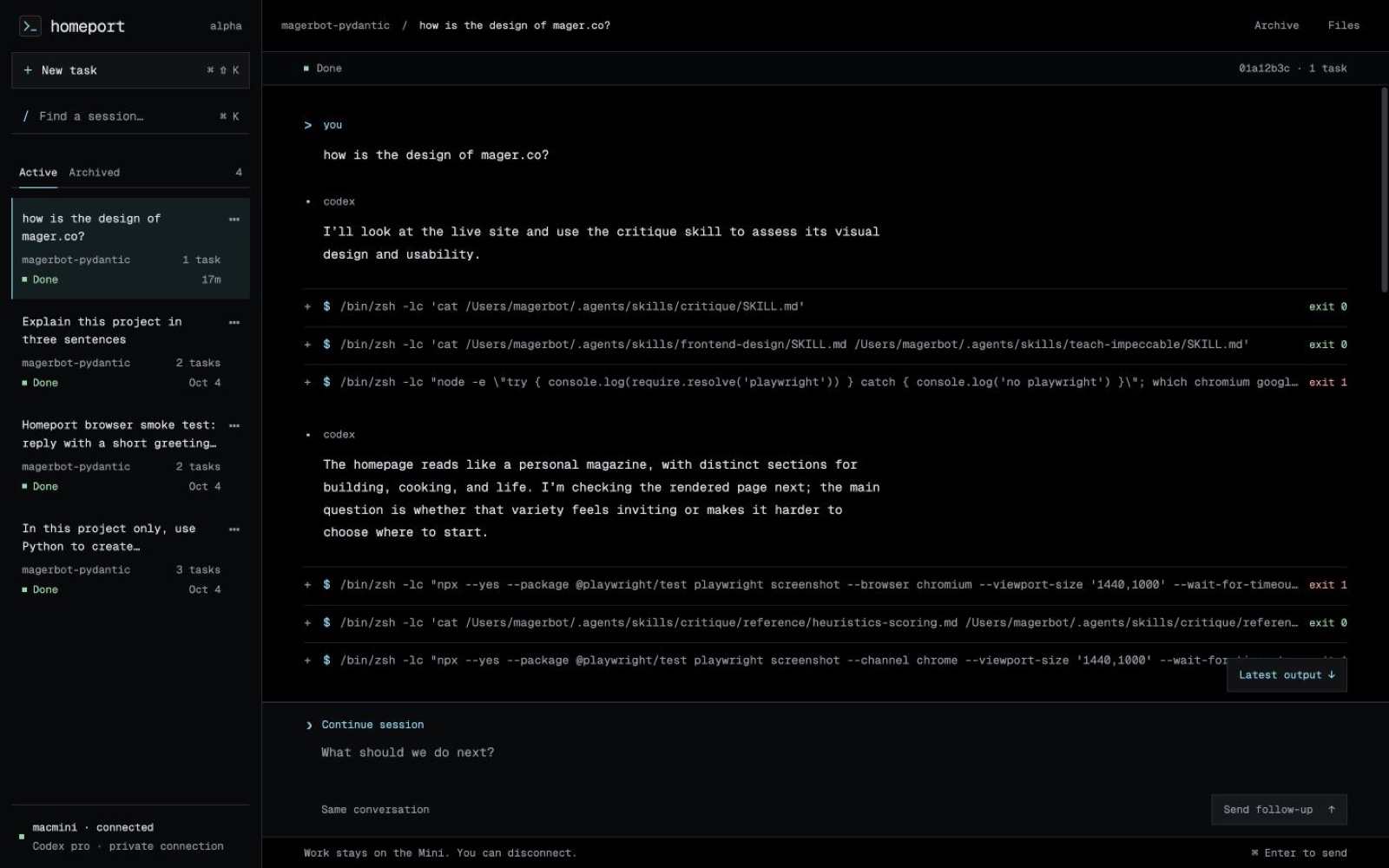
The browser is the everyday interface: search saved sessions, inspect command output, copy code, and continue the conversation. Archive hides a session without deleting its history or stopping work. The optional terminal is there when I want it; it is not required to keep a task alive.
A macOS LaunchAgent supervises the tmux processes for App Server, the worker, and the web app. A browser close or SSH disconnect leaves them running on the Mini. After a reboot, the LaunchAgent needs the user’s macOS session. Unattended boot and FileVault unlock are not configured or tested.
The public Homeport site runs on Vercel. The workspace shown above stays on the Mini. It is still an early release with one worker, no push notifications, and no multi-user collaboration. The source and setup notes are in mager/homeport.
The useful part is being able to leave the work and return to it. Codex App Server supplies the agent and conversation interface. Homeport supplies the queue and browser. Pydantic makes the data passed between those parts explicit and checked.