Diving into Impeccable: design verbs, slop detection, and learning to contribute
One of my favorite plugins turns design direction into something I can ask for by name. Exploring its skills, browser tools, and static analyzer made me want to help build it.
On this page 6 sections
Impeccable is one of my favorite plugins. I can't live without it at work. This is pretty much how I use it:
Use my Impeccable design skills to make this bolder. Delight on overdrive.
That's an actual way I ask for design work, and it captures what I love about the tool. Once you learn the verbs, you can describe the change you want. You start feeling like a designer. 😇
I recently got a ChatGPT Pro account and wanted to put some of my tokens toward contributing to Impeccable. Exploring the repository with Codex and Astra has turned into a lesson in how much the tool does beyond the few skills I already used. I'm still reproducing bugs and finding the best way to contribute, including ideas for new slop detection checks.
What Impeccable does
Impeccable is an open-source design toolkit for AI coding agents, created by Paul Bakaus. It gives the agent guidance on typography, layout, color, motion, UX, and the repetitive design habits that make generated pages look interchangeable. You use it inside your coding tool, where it can work with your actual project.
The Impeccable website keeps getting better at explaining the tool. The site puts its own design approach on display. Its before-and-after examples show what the guidance changes: the decorative defaults disappear, and the content gets easier to read.
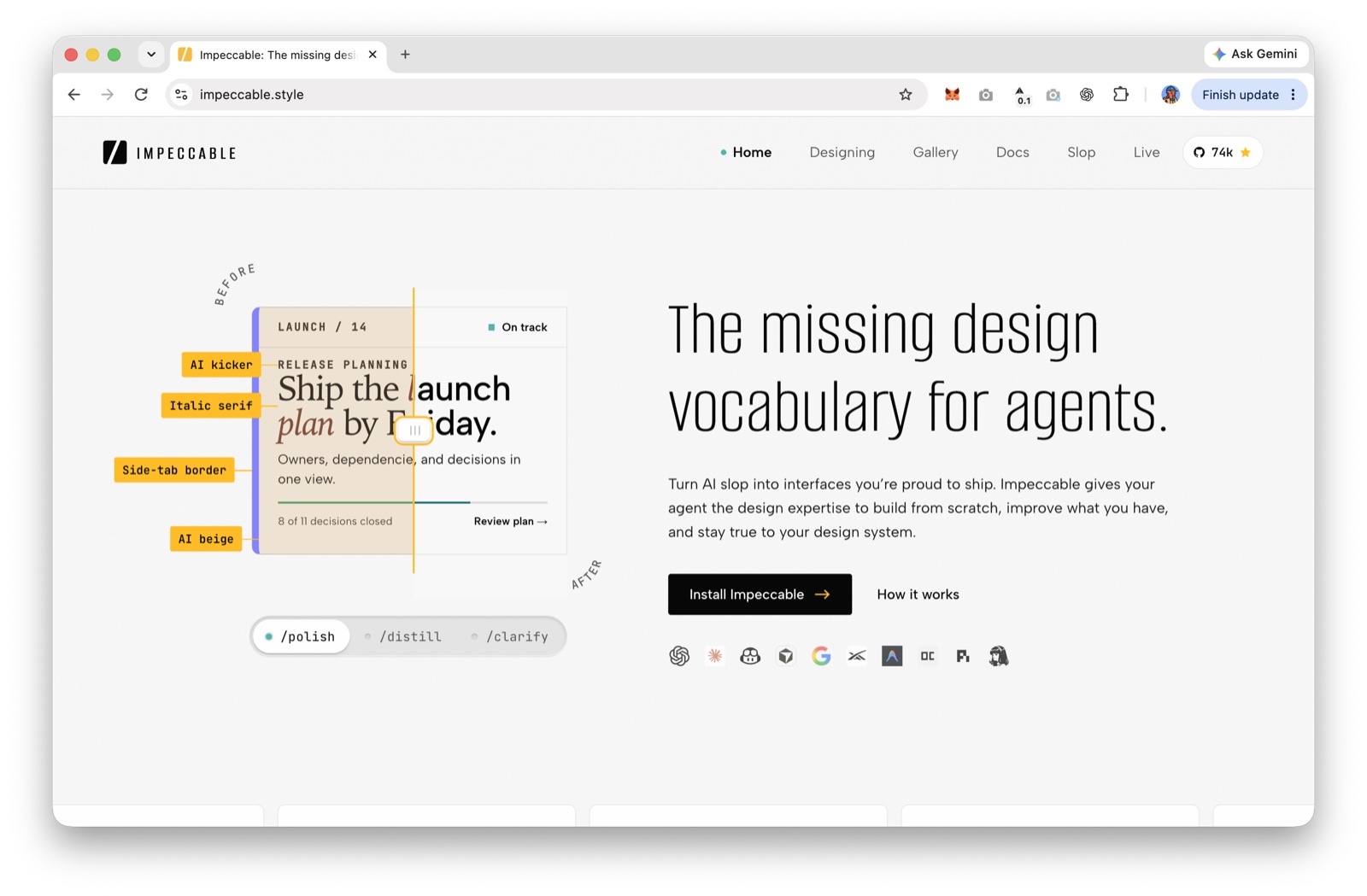
A skill is a set of instructions and supporting resources the agent loads for a task. Impeccable packages its design workflows as commands under one main skill. I tend to call them my design skills; the useful part is the vocabulary they give me.
That vocabulary covers more than making a page prettier. You can plan an interface, critique it, simplify it, improve its copy, check accessibility, or prepare it for real-world content. The command reference is a good place to see the range.
Learn the verbs
Here are the ones that make the idea click:
| What I want to change | Verb | What it asks the agent to focus on |
|---|---|---|
| This feels timid | bolder |
Stronger hierarchy and visual character |
| This works, but feels lifeless | delight |
Personality, feedback, and moments of joy |
| Push the implementation further | overdrive |
Ambitious effects and interactions suited to the interface |
| There's too much going on | distill |
Remove complexity and keep the essential parts |
| The text feels off | typeset |
Typography, hierarchy, sizing, and readability |
| Something feels wrong, but I can't name it | critique |
Evaluate the design and explain what needs attention |
| Check the implementation | audit |
Accessibility, performance, responsiveness, and other technical concerns |
| It's almost ready | polish |
Alignment, spacing, consistency, and finishing details |
My “delight on overdrive” prompt is conversational direction. The named workflows also give you a more explicit way to ask. In Codex, for example:
$impeccable bolder the hero section
$impeccable delight the empty state
$impeccable audit this page
Most other supported agents use /impeccable as the prefix. The target matters: a hero, an empty state, and a settings form need different kinds of attention.
The best part is learning to recognize those differences myself. Is the page missing hierarchy? Is the copy unclear? Does it need more personality, or less decoration? Having names for those decisions helps me give better direction and evaluate what comes back.
Even overdrive is about context. Its guidance distinguishes a creative portfolio from a settings page. A dramatic visual effect might belong in one; fast saves and carefully handled state transitions might be the impressive part of the other. I still choose the direction and judge the result.
More than a prompt library
As I posted on X, discovering features has been the best part of trying to contribute. I'd started using audit on a personal site and at work, and learned that the browser extension could scan a page.
These features do different jobs. audit asks the agent to investigate technical quality and produce a report. critique looks at the design experience: hierarchy, clarity, and whether the interface makes sense. The browser extension runs detector checks against a page and shows findings. Those deterministic checks don't need an LLM or an API key.
I tested Impeccable's Chrome extension in Firefox with a local compatibility patch, scanning prxps, my free sports picks app. It has the fun of calling a game without wagering money. Once I got the scanner running, my old AI-assisted interface lit up yellow. Glowing shadows, a decorative spotlight, a hero eyebrow, tiny labels, and low-contrast text: quite a collection.
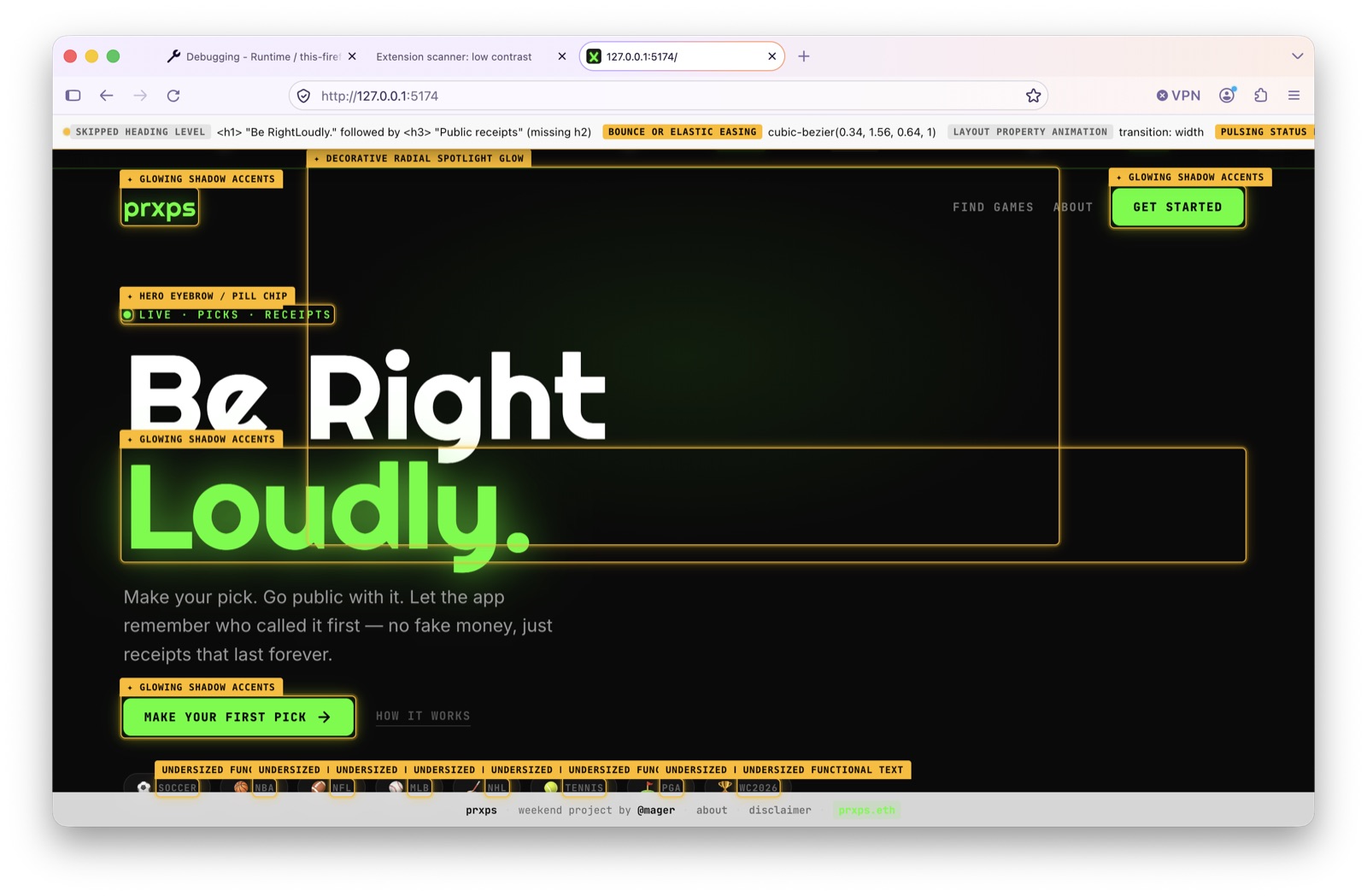
The next screen flagged more low-contrast copy and undersized labels; the strip across the top also called out skipped heading levels and animation choices. Those are concrete things I can inspect and decide how to fix. The screenshots show the extension's detector overlay, rather than an agent's audit report.
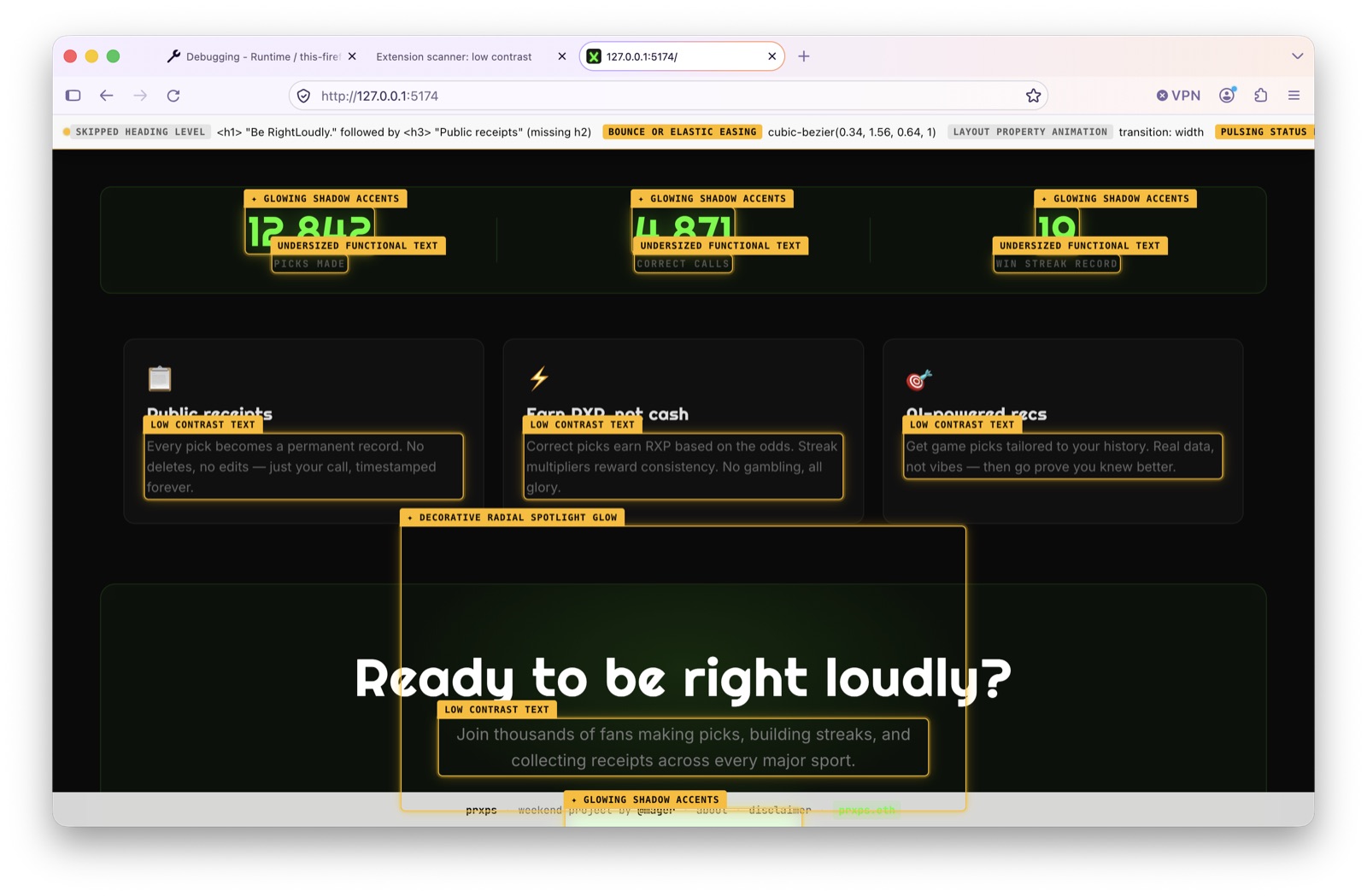
I was already working on prxps with Claude Opus 4.5 months ago; this redesign commit even describes removing gimmicky effects. Looking at the scanner now, I still have some cleaning up to do.
Live mode adds another workflow: pick an element in a running page, describe a change, compare variants, and accept the one you want back into the source. That gives you something concrete to react to while exploring a direction.
There's project context, too. init records what the product is for in PRODUCT.md; document captures an existing visual system in DESIGN.md. That helps later work stay connected to the audience and the design already in the code.
Then I discovered the static analyzer.
Static analysis is fun, actually
Static analysis inspects code without running the application. In Impeccable's case, the static HTML engine reads markup and supported CSS, including local linked stylesheets and CSS variables. It can report certain problems before you open a browser.
I tried a small experiment using a local build of the Rust engine. An HTML page linked to a stylesheet, and a paragraph got its color from a variable:
:root { --ink: #aaa; }
body { background: #fafafa; color: #222; font: 16px/1.6 Georgia, serif; }
.message { color: var(--ink); }
Then I scanned the file:
impeccable detect --no-config --json index.htmlThe analyzer followed the stylesheet, resolved the variable, and reported 2.2:1 contrast where 4.5:1 was needed. Changing --ink to #222 cleared the finding. Same input, same check, repeatable result. I think that's awesome: a specific design problem becomes something I can measure and verify.
detect is an engine command, which helped clear up my earlier confusion about asking for a skill named “detect.” The engine is written in Rust, and shared rules also compile to WebAssembly for browser use. You don't need to write Rust to use Impeccable, but investigating a detector can take you into that code.
Static analysis has limits. It doesn't execute the page's JavaScript or establish its actual painted layout. A browser scan has access to different evidence, such as rendered geometry and visibility. Neither a clean scan nor an empty findings array proves the whole interface is good.
It reminds me of AI evals: turn what you can measure into repeatable checks, and keep contextual judgments grounded in examples.
Learning to contribute by reproducing bugs
A mobile menu bug showed why the detector itself needs testing. Links inside a closed <details> element retained layout rectangles even though Chrome wasn't painting them. The detector reported collisions with invisible links.
With agent-browser and a small mobile fixture, I got five false warnings with the menu closed, none when it was open with enough space, and five real warnings when I deliberately covered the open menu. That last case matters: the fix needs to preserve detection of real problems.
I also reproduced a Firefox extension failure on my local prxps app. The scanner tried to use a Chrome-specific background API. My local patch gives Firefox another way to host the rule core, and I tested scanning and rescanning in both browsers.
Other investigations took me through gradient contrast, React source selection, and file timestamps being mistaken for content changes. Some fixes were already underway with the maintainers. I'm learning to check ownership, describe exactly what I verified, and get approval before opening a PR. A small, reliable reproduction is useful work in itself.
Suggesting new slop checks
I opened a proposal for an advisory hard offset shadow check, covering patterns such as box-shadow: 4px 4px 0 #333. Impeccable's design guidance discourages them outside an intentional neobrutalist direction, but my synthetic examples didn't trigger a detector finding.
The exception is the interesting part. On neobrutalism.dev, hard shadows belong to the chosen style. Detecting the CSS shape is easier than deciding whether it belongs on a particular page.
The proposal asks whether an advisory check could flag the pattern for review without treating every use as a failure, or whether this belongs in the agent's design guidance. I included the static-engine results, intentional-use examples, and a test plan. I still need examples where the effect clearly conflicts with the intended design. I've offered to implement the check and am waiting for maintainer feedback before opening a PR.
That's where I am: using a plugin I love, learning how it works, and trying to contribute something useful. If you're new to it, start with the installation guide, pick a page you know well, and learn a few verbs. For me, bolder, delight, and overdrive opened the door. I'm still finding out how much is behind it.